
Contents (12 sections)
Maintaining your smartphone is crucial not only for its longevity but also to enhance its performance. A well-cared-for smartphone can last several years and provide a smoother user experience. In this guide, we'll go over essential smartphone maintenance tips, break down actionable steps, and arm you with the knowledge to keep your device in top condition.
📋 Table of Contents
- Understanding Smartphone Care
- Regular Software Updates
- Battery Maintenance Tips
- Physical Protection and Cleaning
- Data Management and Backup
- Common Mistakes to Avoid
- Checklist for Smartphone Maintenance
- Frequently Asked Questions
Understanding Smartphone Care
What exactly is smartphone maintenance and why does it matter? Proper phone maintenance involves a set of practices aimed at ensuring your device remains in optimal condition over its lifespan. Regular maintenance can prevent common issues like software crashes, slow performance, overheating, and battery problems. A report by Statista indicates that regular maintenance can enhance device longevity by up to 30%.
Key aspects of smartphone maintenance include updating software, managing battery health, protecting the device from physical damage, and securing important data. Furthermore, consistent care not only prolongs the lifespan of the device but also enhances its performance and retains resale value. In today's fast-paced digital world, ensuring your smartphone functions seamlessly is essential.


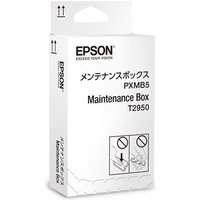
Epson Maintenance Box For EcoTank Printers- Print, Copy, Scan & Fax~~Printers & Copiers~~Printers~~Photo Printers
parkcameras.com
Regular Software Updates
One of the most important smartphone maintenance tips is to keep your operating system and apps up to date. Software updates are essential for several reasons:
- Security Enhancements: Regular updates address potential vulnerabilities that hackers may exploit.
- New Features & Improvements: Manufacturers frequently add new features and improve existing ones, enhancing user experience.
- Bug Fixes: Updates often contain fixes for known issues, improving stability and performance.
To enable automatic updates, go into your device's settings and check for the appropriate option. This step ensures that you won’t miss any crucial updates, keeping your device secure and efficient. Additionally, try to avoid downloading apps from unknown sources, as these can be harmful and lead to malfunctions or security breaches.
Battery Maintenance Tips
Battery health is a critical component of smartphone longevity. Here are some practical battery maintenance tips to keep your smartphone powered effectively:
- Avoid Overcharging: Letting your smartphone sit plugged in for extended periods can degrade battery life over time. It's best to unplug once the battery reaches 100%.
- Use Power Saving Modes: Most smartphones come with built-in power-saving features. Enabling this can help extend the battery’s lifespan while ensuring necessary functions remain operational.
- Temperature Awareness: Extreme temperatures can affect battery performance. Avoid leaving your smartphone in direct sunlight or very cold environments.
Monitoring battery performance via your device’s settings can provide insights on battery health and manage applications consuming excessive power. As a reference, Battery University states that lithium-ion batteries thrive when kept between 20% to 80% of charge.
Physical Protection and Cleaning
Physical protection of your smartphone is paramount to avoid damages from drops or spills. Here are some best practices:
- Use a Quality Case: Invest in a durable case that suits your lifestyle. There are a variety of options available, from slim cases to rugged models designed for outdoor activities.
- Screen Protectors: Applying a screen protector can prevent scratches and cracks. Choose tempered glass for optimum protection without compromising touch sensitivity.
- Regular Cleaning: Over time, dust and grime can accumulate on your phone, affecting functionality and aesthetics. Use a microfiber cloth and specific cleaning solutions appropriate for electronics to gently wipe your device.
For thorough cleaning, avoid abrasive materials and harsh chemicals; these can damage the phone's finish and internal components.
Data Management and Backup
In today's age, your smartphone likely holds a wealth of personal and sensitive information. Proper data management is vital:
- Regular Backups: Consistently back up your data either to a cloud service or an external device. Many smartphones offer options to automate this process during routine updates.
- Organise Your Files: Regularly declutter your device by removing unnecessary apps, photos, and files to improve performance.
- Secure Your Data: Enable security measures such as two-factor authentication and strong passwords to protect sensitive information.
According to Google, backing up your data frequently can safeguard against losing vital information, especially in the event of theft or hardware failure.

Xerox Phaser 5500/5550 220 Volt Maintenance Kit (300,000 pages)
Back to the Office
Common Mistakes to Avoid
While it’s essential to maintain your smartphone, several common mistakes can undermine your efforts:
- Ignoring Updates: Regularly postpone updates may lead to vulnerabilities and malfunctions.
- Using Unofficial Chargers: Off-brand chargers can be substandard, risking battery integrity and device safety.
- Neglecting Device Cooling: Overheating is detrimental; avoid playing intensive games while charging for extended durations.
Learning from others' experiences and understanding the nuances of smartphone care can help you avoid these pitfalls effectively.
Checklist for Smartphone Maintenance
To help keep your smartphone in optimal condition, here’s a checklist:
- [ ] Enable automatic software updates
- [ ] Check and maintain battery health regularly
- [ ] Use a protective case and screen cover
- [ ] Clean the device weekly
- [ ] Backup data at least once a month
Frequently Asked Questions
Q: How often should I update my smartphone?
A: It is best to update your smartphone regularly whenever updates are available to ensure you benefit from the latest features and security patches.
Q: Can I charge my smartphone overnight?
A: While most devices have built-in mechanisms to prevent overcharging, it’s advisable to unplug it once it’s fully charged to prolong battery life.
Q: What is the best way to clean my smartphone?
A: Use a microfiber cloth dampened with a suitable cleaning solution for electronics, avoiding harsh substances that might damage the screen.
Q: Should I use my smartphone while charging?
A: It is advisable to limit intensive tasks like gaming while charging as this can lead to overheating.
📺 For Further Learning
Consider watching informative YouTube content about smartphone maintenance. A quick search like "smartphone maintenance tips 2026" can yield useful tutorials.
🧠 Quick Quiz: What is the ideal battery charge range for longevity?
- A) 0% to 20%
- B) 20% to 80%
- C) 80% to 100%
Answer: B — Keeping your battery within this range is known to enhance battery health.
Glossary
| Term | Definition |
|---|---|
| Software Update | A process through which improvements and security patches are installed on your device. |
| Battery Health | A measure of the battery's ability to hold a charge over time. |
| Data Backup | The process of copying data to a secure location to prevent loss. |
---
📺 Pour aller plus loin : smartphone maintenance tips 2026 sur YouTube
Recommended products
Selected by our experts


TP-Link OC200 Omada Hardware Controller, SDN Integrated, PoE Powered, Manage Up to 100 Devices, Easy & Intelligent Network Monitor & Maintenance, Clou
Amazon Sellers Programme (UK)